
This reference covers event categories and custom event capabilities available when configuring postbacks in Katalys. Event categories determine which types of user activity trigger a postback, and custom events extend this system to support proprietary actions specific to certain programs.
Initial Setup
The Use Case you select when creating a postback (Billable Conversions, Touched Conversions, or All Events) sets your initially selected categories.
-
Billable Conversions: Only billable, completed orders trigger the postback.
-
Touched Conversions: All partner-influenced completed orders (billable and non-billable) trigger the postback.
-
All Events: Every event of every type from your CRM/website triggers the postback. This is the broadest possible configuration.
You can customize these selections immediately after choosing a Use Case.
Event Categories
Every postback in Katalys can be configured to fire on one or more of the following standard event categories. These categories map to distinct stages of the customer journey, from initial awareness through completed purchase.
Views
-
What it tracks: A user viewed a product, offer, or landing page.
-
When it fires: Each time a tracked page view or product impression is recorded by the Katalys attribution engine.
-
Typical use cases:
-
Building awareness-stage retargeting audiences in Google Ads, Meta Ads, or TikTok Ads
-
Tracking top-of-funnel reach across partner placements
-
Measuring impression volume for CPM-based programs
-
Engagement
-
What it tracks: A user took an active engagement action such as adding a product to cart, or starting a signup flow.
-
When it fires: Each time an engagement event is captured — this goes beyond passive views and indicates active interest from the user.
-
Typical use cases:
-
Building mid-funnel retargeting audiences of users who showed purchase intent
-
Tracking click-through rates and add-to-cart activity across partner placements
-
Triggering webhook notifications to your CRM when a prospect takes action
-
Progress
-
What it tracks: A user completed an intermediate step in the purchase funnel — somewhere between initial engagement and final conversion.
-
When it fires: When a progress event is recorded, such as reaching a checkout page, completing a form step, or entering payment information without completing the purchase.
-
Typical use cases:
-
Retargeting users who reached checkout but did not convert
-
Tracking funnel drop-off rates across partner traffic
-
Triggering abandonment recovery workflows via webhook
-
Conversions
-
What it tracks: A completed purchase, subscription, or other final conversion event that is payable to Katalys affiliates.
-
When it fires: When an order or conversion is confirmed and recorded by the Katalys attribution engine. This is the most commonly used event category for postbacks.
-
Typical use cases:
-
Sending confirmed conversion data to Google Ads, Meta Ads, or TikTok Ads for audience building and bid optimization
-
Triggering webhook notifications to your affiliate network, CRM, or analytics platform
-
Reconciling orders between Katalys and your internal systems
-
Partial Conversions
-
What it tracks: A completed purchase, subscription, or other final conversion event that is not payable to your affiliate account.
-
When it fires: When a partial conversion event is recorded, this represents a customer that your traffic may have influenced, but did not result in a payout.
-
Typical use cases:
-
Tracking influence campaigns
-
Building audiences of converters for look-alike targeting
-
Sending partial conversion signals to your attribution or analytics system for pipeline tracking
-
Choosing the Right Categories
The categories you enable depend on your postback method and goals.
|
Goal |
Recommended Categories |
|---|---|
|
Track completed sales only |
Conversions |
|
Build full-funnel retargeting audiences |
Views + Engagement + Conversions |
|
Monitor the entire customer journey |
All categories enabled |
|
Track trial signups and partial orders |
Conversions + Partial Conversions |
|
Trigger abandonment workflows |
Engagement + Progress |
For ad platform audience postbacks (Google Ads, Meta Ads, TikTok Ads), enabling Conversions only is the most common and recommended configuration. Enabling additional categories sends more data to the ad platform, which can help with audience building but may also increase noise.
All available events for a program are documented on the Program Description page. Navigate to Explore → Choose a program, and scroll down. You will find available events for that program listed in a table.
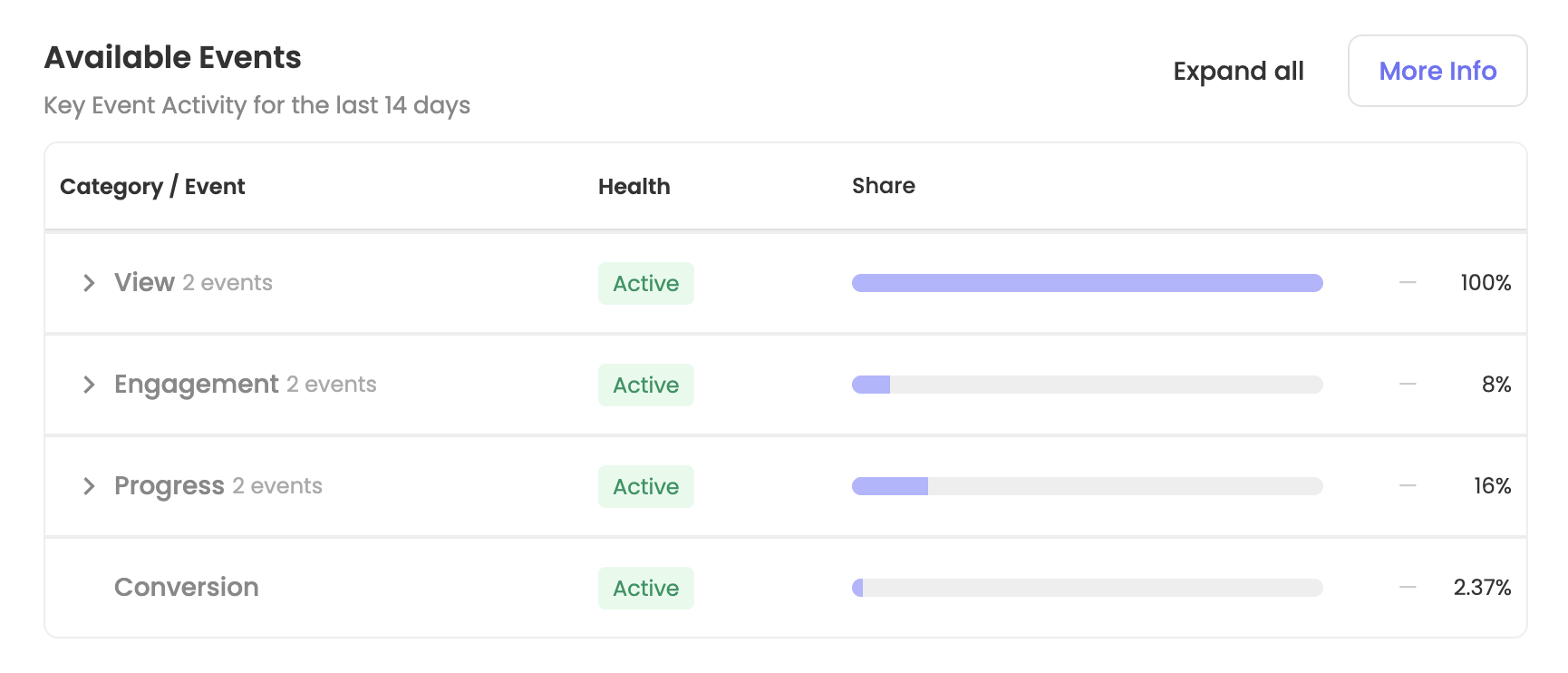
Newly-created programs might not have their events properly categorized yet. You can still setup a postback by using “Custom Events” to individually select events, instead of selecting categories. Read more below.
Custom Events
Custom events extend the standard category system by allowing you to trigger postbacks on specific, named actions that occur on an advertiser’s website.
What Are Custom Events?
A custom event is a postback trigger tied to a specific user_action_name — a string identifier that an Advertiser’s integration sends to Katalys when a particular action occurs. Custom events allow you to specify fine-grained routing on the data being sent by either re-routing an event (such as changing page_view from being sent as a standard ViewContent event to a custom name), or by including an event that is uncategorized (such as an event that an advertiser has not configured yet or has marked as “Uncategorized”).
Setting Up Custom Events
-
Open a postback configuration in Integrations → Postbacks.
-
Scroll to the bottom of the form and expand the Advanced section.
-
In the Custom Events field, enter the
user_action_nameyou want to trigger this postback. -
Click Add.
-
Repeat for each custom event you want to include.
Custom event configurations replace any other configuration for that event. For example, the event page_view is typically mapped to the category “Views”. If you add page_view as a custom event, then page_view will use your custom mapped configuration instead of using the configuration for “Views”.
Custom Event Requirements
-
The
user_action_namemust exactly match the action name sent by your integration (case-sensitive). -
Custom event names should be descriptive and use lowercase with underscores (e.g.,
signup_complete, notSignupComplete). -
There is no limit to the number of custom events you can add to a single postback.
-
Custom events are validated against incoming event data in real time — if the action name does not match, the postback will not fire.
Custom Event Warnings
If a postback is configured to fire on a custom event name that has not yet been received, you may see a warning appear. This typically indicates:
-
The custom event has not been implemented in the advertiser's integration yet.
-
There is a mismatch between the event name in the postback configuration and the name being sent by the integration.
-
The event is being generated but filtered by a program-level limit.