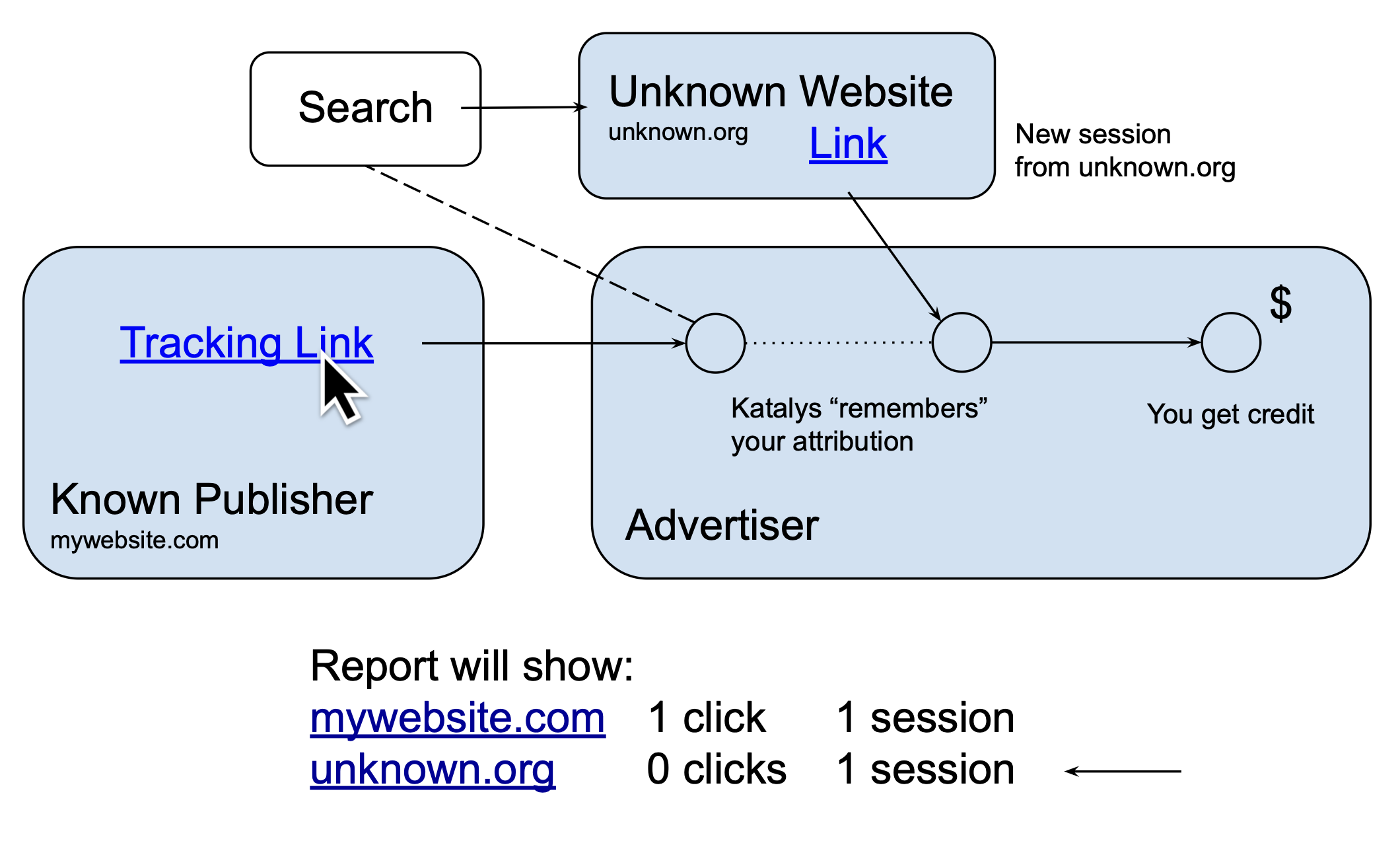
The Katalys Tracking Script records data about user sessions. Sessions are more reliable than clicks in determining healthy traffic. Since bots or crawlers frequently block or skip tracking, session analytics can help affiliates understand traffic quality and depth.
Understanding Sessions
Sessions are groups of page views starting with an “entrance” and ending when another entrance occurs or the local tab is closed.
-
A session entrance occurs when the user has no existing session, or when the URL contains utm_* tracking parameters. An entrance resets the Session ID value, which will count one more session for this user if the user is included in your report.
-
A session ends when the Session ID is replaced or the browser tab is closed. This means sessions can last for days, as long as the browser tab is open.
Some Katalys Programs do not report sessions! If the Katalys Tracking Script is not running on a specific landing page on the advertiser’s website, tracking may still be working but no sessions will be generated.
Katalys works with advertisers to provide affiliates the most granular reporting available. Nevertheless, not all advertisers implement Katalys technology the same. For the highest confidence, use a Landing Page configured in Katalys' system – these links should always track correctly even if they do not generate sessions. Read Tracking Link Types to understand differences.
Reporting on Sessions
Katalys counts sessions by counting the number of unique Session IDs within the current time-box. Depending on how you breakdown your data, a session can be counted inside of more than one box. To report on sessions, choose a sessions-related dimension. Here are the most popular:
-
Sessions: Network– this column will count unique sessions that were driven by Katalys. -
Sessions: Total Active– this column will count any unique session that was recorded by Katalys for any reason.
To demonstrate how session-counts can change, add a timeframe column such as “By Day”. You might see that the sum of the numbers shown is higher than the sum before adding the column. This is because some users persist across days – they might leave their browser tab open.
This differential becomes more dramatic if you choose “By Hour”. Counting unique sessions per hour will count a session as happening in one hour, and again in another hour.
We recommend using no date breakdown or “By Day” when using Session dimensions. This gives you the cleanest lens into your traffic.
Why Do I See Weird Referrers?
If you have added other traffic-related dimensions such as Referring Domain or Referring URL, you might see referrer values you do not recognize. These values are real, recorded on traffic that was driven by your affiliate links.
To remove these rows, remove Session-related dimensions from your report. Instead, use only Click-related dimensions. Your clicks will come from your own campaigns. Therefore, using dimensions like “Clicks”, “CR”, or “EPC” will show you Referrer values that are relevant to only your traffic sources.
Explanation: A visitor might visit any number of websites before or after yours. There is no method for our system to filter out referrers that are not owned by you – our system reports the data exactly as it was recorded.